miércoles, 22 de agosto de 2018

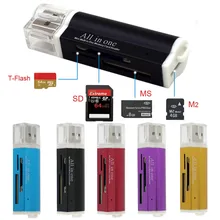
23) Multi Card Reader PC (SM, SD, MS (Memory Stick), Memory Stick PRO (MS-PRO), MS-Duo, microSD, miniSD, Multi Media Card (MMC), eSATA)

23) Multi Card Reader PC (SM, SD, MS (Memory Stick), Memory Stick PRO (MS-PRO), MS-Duo, microSD, miniSD, Multi Media Card (MMC), eSATA)
- A memory card reader is a device for accessing data on a memory card such as CompactFlash (CF), Secure Digital (SD) or MultiMediaCard (MMC). Most card readers also offer writing capability, and along with the card, this can work as a pen drive.
Some printers and smartphones have a built-in card reader, as do most personal computers and most tablet computers.
A multiple card reader is used for communication with more than one type of flash memory card. Multiple card readers do not have built-in memory capacity, but can accept multiple types and styles of memory cards.
The number of compatible memory cards varies from one reader to another and can include more than 20 different types. The number of different memory cards that a multiple card reader can accept is expressed as x-in-1, where x is a number that indicates the number of memory cards accepted, such as 35 in 1. There are three categories of card readers sorted by type and number of card slots: individual card reader (for example, 1x SD-only), multiple card reader (for example 9-in-1) and serial card reader (for example, 4x SD-only )
Some types of memory cards with their own USB functions do not need the card reader, such as the Intelligent Stick memory card, which can be connected directly to a USB slot.
The USB device class used is 0x08.
Modern UDMA-7 CompactFlash and UHS-I Secure Digital cards provide data rates greater than 89 MB / s and up to 145 MB / s, [1] when used with memory card readers with USB 3.0 data transfer capability.
Resultado de imagen para 23) Multi Card Reader PC (SM, SD, MS (Memory Stick), Memory Stick PRO (MS-PRO), MS-Duo, microSD, miniSD, Multi Media Card (MMC), eSATA)

22) Hard Drives Connections (Sata, IDE) Technologies (HDD, SCSI, SSD, SSHD)

22) Hard Drives Connections (Sata, IDE) Technologies (HDD, SCSI, SSD, SSHD).
-SATA: (Serial ATA) is the one currently used by desktop and laptop computers of the latest generation, it is a novel interface that uses a serial bus for the transfer of data of course faster and more efficient than the IDE system
- IDE: is a unit that uses a parallel ATA connection, called IDE informally. The term IDE is synonymous with Integrated Drive Electronics Interface (Integrated Electronic Unit Interface). The first time the hard drives used the IDE interface was in 1986.
- HDD: Ó Hard drives are conventional hard drives, their acronym comes from the English "Hard Disk Drive", this technology is the oldest of the three since it is the only one that requires mechanical movement to function.
The hard disk works in the following way, inside it has a magnetic head that goes encoding tiny sectors of a metallic disk in rotation at high speeds, these heads write on the disk using binary code (0 and 1).
-SSI: Small Computer System Interface Small computer system interface, better known by the English acronym SCSI is a standard interface for the transfer of data between different devices of the computer bus.
- SSD: or disk in solid state The SSD or disk in solid state are the natural evolution of the HDD technology or hard disk, the discs in solid state do not require of mechanical movement with which they do not heat so much, make less noise and require less energy
The SSDs use the same SATA connector as the HDD, despite this they achieve much higher speeds reaching 6Gbps (540 MB / s) of read and write.
-SSHD: Solid state drive (SSD) + hard disk drive (HDD) = Hybrid solid state drive (SSHD) and innovation. Hybrid solid-state drives (SSHD) combine a small, fast, and affordable amount of NAND-type flash memory with a traditional hard drive

21) Cooling Systems (Dissipater, Fan, Liquid).

Resultado de imagen para 21) Cooling Systems (Dissipater, Fan, Liquid).21) Cooling Systems (Dissipater, Fan, Liquid).
- Refrigeration system: Result of image for refrigeration system Definition The so-called refrigeration systems or refrigeration systems correspond to mechanical arrangements that use the thermodynamic properties of the material to transfer heat energy in the form of heat between two or more sources, as required .
-Displacer: A dissipator is an instrument that is used to lower the temperature of some ... able to use heatsinks of reasonable dimensions, becoming necessary to use other forms of cooling such as liquid cooling.
-Ventilator: A fan is a fluid machine, more exactly a turbo transmitting machine ... An example of this are evaporators and condensers in air cooling systems, in which a fan improves efficiency.
-Liquida: The liquid cooling or watercooling is a cooling technique that uses water instead of heat sinks and fans (inside the chassis) and thus achieves excellent results in terms of temperatures, and with enormous possibilities of overclock. It is usually done with watertight water circuits.

20) Transmission Media (Wi-Fi (a, b, c), Bluetooth, IrDA, RJ11, RJ45, RS-232)

20) Transmission Media (Wi-Fi (a, b, c), Bluetooth, IrDA, RJ11, RJ45, RS-232)
-WiFi 802.11a
The first revision of the 802.11 standard was born back in 1999 and operates over the 5 GHz frequency band, with a maximum speed of 54 Mbps.
-WiFi 802.11b
The revision 802.11b soon began to enjoy great general acceptance due to the fact that operating in the 2.4 GHz band reduced the attenuation eliminating many interferences improving the quality of the Wi-Fi signal.
- WiFi 802.11ac
The new WiGig standard brought the great speeds to wireless connections and proof of this is the advance achieved with Wi-Fi 802.11ac.
-WiFi 802.11ad
The Wi-Fi technology baptized as WiGig is also one of the most recent and although it is still not very well known to the general public, it will soon begin to be so due to its incredible potential. Not only because equipment compatible with it has already been announced, such as the Talon Ad7200 from TP-Link, but above all by the speeds of up to 4.6 Gbps it can offer in the 60 GHz frequency band.
-Bluetooth: is an industrial specification for Wireless Personal Area Networks (WPAN) created by Bluetooth Special Interest Group, Inc. that enables the transmission of voice and data between different devices through a radio frequency link in the ISM band of 2.4 GHz.
-IRDA: Infrared Data Association (IrDA), "Infra-Red Data Association", defines a physical standard in the form of infrared transmission and reception of data. IrDA was created in 1993, between: HP, IBM, Sharp and others. This technology is based on light rays that move in the infrared spectrum.
-RJ11: RJ11 plug. The RJ11 connector (RJ stands for Registered Jack) is the most used connector for telephone lines. It is similar to an RJ45 connector but smaller. On a computer, it is usually used to connect the modem.
-RJ45: It is a physical interface commonly used to connect computer networks with structured cabling (categories 4, 5, 5e, 6 and 6a). It has eight pins or electrical connections, which are normally used as twisted pair cable (UTP) ends. It is part of the United States Federal Code of Regulations
-RS-232: (Recommended Standard 232, in Spanish: "Recommended Standard 232"), also known as EIA / TIA RS-232C, is an interface that designates a standard for the exchange of serial binary data between a DTE (Data Terminal Equipment, "Terminal Data Equipment"), such as a computer.
Resultado de imagen para 20) Transmission Media (Wi-Fi (a, b, c), Bluetooth, IrDA, RJ11, RJ45, RS-232)Resultado de imagen para 20) Transmission Media (Wi-Fi (a, b, c), Bluetooth, IrDA, RJ11, RJ45, RS-232)

19) Dedicated video card integrated in the board (CrossFire bridge, SLI bridges).

19) Dedicated video card integrated in the board (CrossFire bridge, SLI bridges).
-Board: An integrated graphics card (iGP: Integrated Graphics Processor) is so called because it depends on the primary memory of the system or our dear RAM. The current integrated chips are embedded directly in the CPU, which determines how much RAM will be used to process graphics in a game.
-Crossfire bridge: It is the name given to the Multi GPU system of ATI / AMD that was designed as a counterpart to nVidia's SLI. This system allows, using a certified Crossfire board, to connect up to four graphic cards that support this technology in PCIe x16 slots.
-SLI bridges: Scalable Link Interface (SLI) is a method to connect two or more video cards (graphics card) and combine their performance. It is a parallel processing algorithm for computer graphics, which increases the processing power available for graphics.
Resultado de imagen para 19) Dedicated video card integrated in the board (CrossFire bridge, SLI bridges).

18) Expansion Slots AGP, PCI, PCI Express

18) Expansion Slots AGP, PCI, PCI Express
- Ports or PCI BUS
PCI BUS. It means Interconnected Peripheral Component and it is a 32-bit communication bus that performs its functions at 33Mhz, transferring data to and from the RAM memory at 133Mbits / s, a satisfactory speed even for PCI-type 2D graphics cards. Thanks to the PCI bus, the processor can work on other more complex functions as it develops manipulations of texture and calculation of polygons for example. PCI slots vary depending on the bits to be transported, as is the case with 32-bit PCI slots and 64-bit PCI slots, which are the most recent. For the electrical requirement there are also three types of PCI cards: 5-volt PCI for desktop computers, 3.3-volt PCI for laptops and Universal that can be used for the two previous systems.

-Ports or AGP BUS
BUS AGP. It means Advanced Graphics Port and it is a system used for the connection of peripherals on the motherboard that transfers data from the microprocessor to the peripheral that is connected to the bus. The AGP BUS offers several types of operation
-Port Express ports
PCI Express BUS. The latest technology, came to replace the PCI and AGP buses, has great transfer speed. It has two speeds, the PCI Express 1X with speed of 133Mhz for devices such as audio cards and TV. And the PCI Express 16X with a speed of 2128Mhz for graphics cards.
Resultado de imagen para 18) Expansion Slots AGP, PCI, PCI Express

17) SATA, PATA or IDE connectors -Ide: In general, the IDE / ATA connector

17) SATA, PATA or IDE connectors
-Ide: In general, the IDE / ATA connector of the motherboard is a simple 40-pin connector to which a flat cable is fastened, which goes from the motherboard to the disk drive. These pins are a subset of the 98 contacts of the 16-bit ISA slots. The reason is that a disk controller never needs more than 40 ISA bus signals.
- Ata: is a data transfer interface between the motherboard and some storage devices, such as the hard disk, CD / DVD / BR readers and re-writers, Solid State Units or other high-performance devices that are still being developed. The ATA standard allows storage peripherals to be connected directly to the motherboard using a ribbon cable, usually consisting of 40 parallel wires and three connectors (usually a blue connector for the motherboard and a black connector and a gray connector for the two peripherals). storage).
- Sata: The sata connector is very thin and lightweight, and barring some new introductions in the present, it does not have a safe that affirms it in the motherboard or in the device, which makes it a very weak connector, too exposed to unplugging or make bad contact with a simple transfer of a PC (in fact the first thing I do when a PC does not boot is to check the SATA cable, and believe me, it is a very high percentage) this is something unforgivable for so many companies and engineers involved.
- Pata: PATA is an abbreviation of adjunct of advanced technology in parallel. It is a regular interface that is used within PCs to connect all kinds of storage devices such as hard drives, CD or DVD drives and solid state disks to the motherboard. The PATA interface connector consists of thirty-four pins and connects to a flat ribbon cable about two inches wide. It does not support hot swapping.
Resultado de imagen para 17) SATA, PATA or IDE connectors -Ide: In general, the IDE / ATA connector